Apple Watch
Reply to your customers from your Apple Watch
In the kitchen, in a meeting, between two customers: your phone is buried in a pocket, and a visitor is waiting for your answer. With the Hooky app for Apple Watch, their message lands on your wrist, and you reply in a few seconds.
Why reply from your watch
On a website, an unanswered question is often a lost customer: “do you deliver to Austin?”, “any spots left on Saturday?”. The visitor waits a minute or two, then leaves. Replying fast matters more than replying at length.
Your watch is always there, even when your phone isn’t. One glance tells you who’s writing, from which site, and what they’re asking. For a short answer, you don’t even need to take out your phone.
Reply from the notification
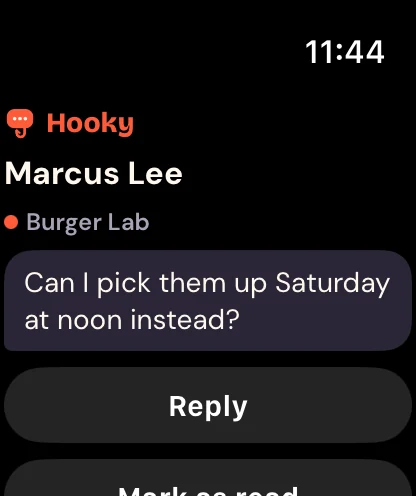
When a visitor writes to you, the notification shows their name, the site and their message. Two buttons are right there, without opening the app:
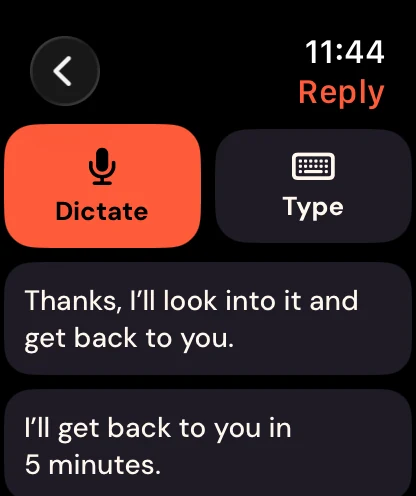
- Reply: dictate your answer, type it on the keyboard, or pick a quick reply (“Thanks, I’ll look into it and get back to you.”, “I’ll get back to you in 5 minutes.”).
- Mark as read: the conversation leaves your unread list, and you can pick it up later on your phone or computer.
Your reply goes straight to the visitor’s bubble, translated into their language if they don’t speak yours. If they left the site after giving their email, it reaches them by email.
The app on your watch
The Hooky app for Apple Watch fits in three pages, which you scroll through with the Digital Crown:
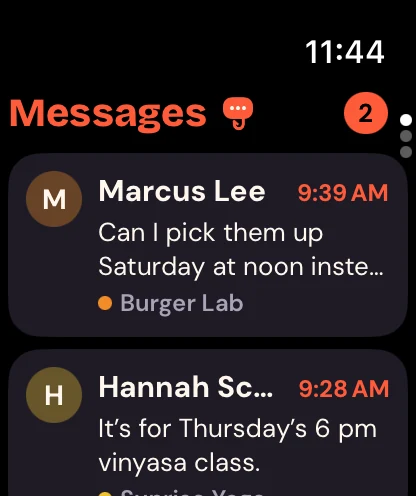
- Messages: your ongoing conversations, most recent first. Tap one to read the latest messages and reply.
- Channels: notifications from your sites (orders, signups, low stock…), sent by your code or your tools.
- Today: today’s numbers across all your sites, with bars for the last seven days.
Your unread messages on your watch face
Add a Hooky complication to your watch face: your number of unread messages, or the whole latest conversation on faces that have room for it. The “Today” widget in the Smart Stack brings together your unread messages and two of today’s numbers. One glance, and you know if someone is waiting.
Install it
Install the Hooky app on your iPhone from the App Store, and log in. The Apple Watch app is included, free, in every plan.
Open the Watch app on your iPhone, My Watch tab: Hooky shows up under the available apps. Tap Install (it often installs on its own).
Open Hooky on your watch: it picks up your iPhone’s session, with nothing to type. After that, it connects on its own, over Wi-Fi or cellular, even when your iPhone is far away.
You need an Apple Watch running watchOS 10 or later, paired with an iPhone. Notifications show up on the watch when your iPhone is locked or out of range: that’s standard iOS behavior.
And on your other devices
The same inbox is waiting for you on iPhone, iPad, Mac and Android, and in your browser. Start a conversation on your watch and finish it on your computer: everything stays in sync. Got a mobile app too? Add the same chat to your app with the iOS, Android and Flutter SDKs.
More articles
Your visitors have questions. Answer them from wherever you are.
Free for one site, installed with one prompt. Then just keep your phone in your pocket.