The Hooky Flutter SDK
The Hooky conversation in your Flutter app: a Dart API and a bubble widget, built on Hooky’s native SDKs. The conversation itself is the one from the iOS (SwiftUI) and Android (Jetpack Compose) SDKs: native, no WebView, in your site’s colors.
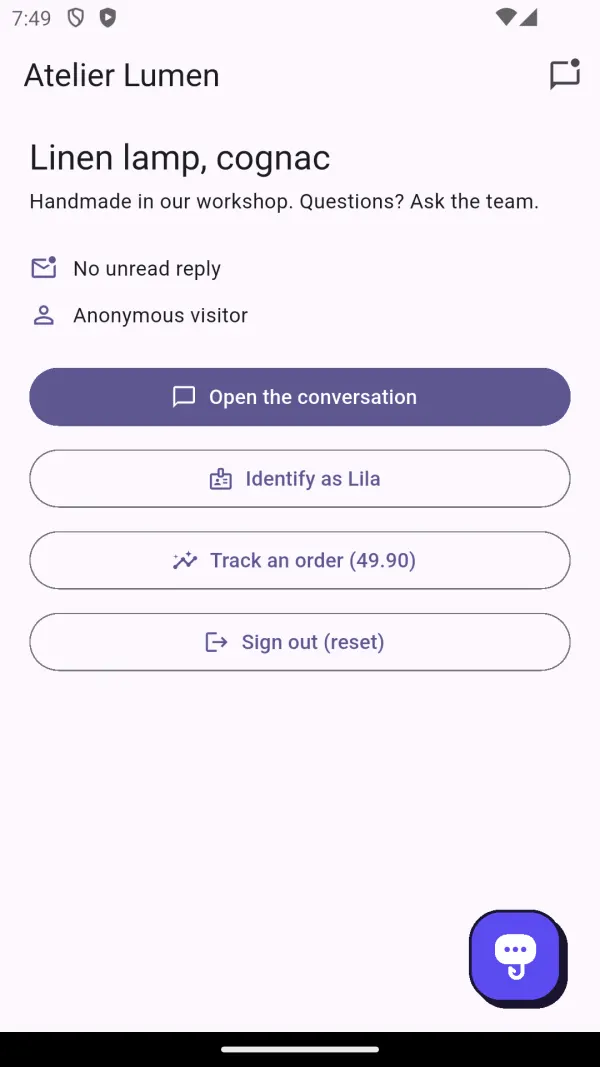
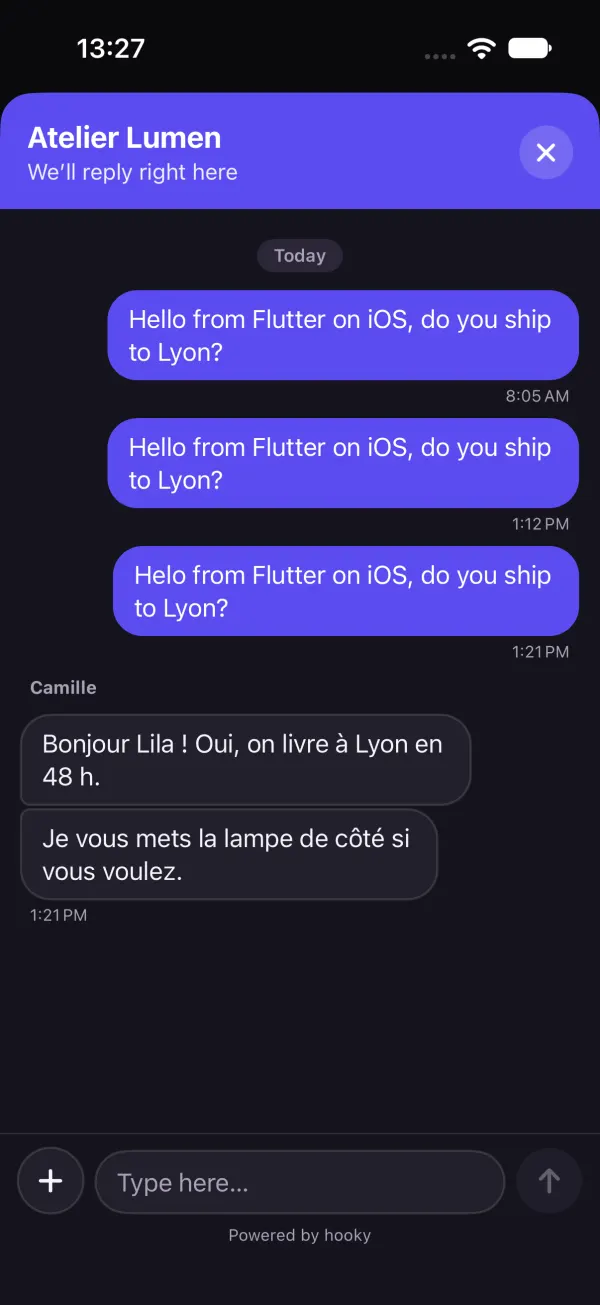
HookyBubble widget on Android, and the native conversation on iPhone, in dark mode.Requirements
- Flutter 3.35 or later (Dart 3.9).
- Android 7.0 or later (
minSdk 24, Flutter’s own minimum), compiled withcompileSdk 36. - iOS 15 or later.
- Android and iOS only: on web and desktop, calls do nothing.
- A Hooky account and a site: its public key is in Sites › Install, the same as the web bubble’s
data-site-key.
Installation
The package installs from its GitHub repository, as a git dependency. In your pubspec.yaml:
dependencies:
  hooky_sdk:
    git:
      url: https://github.com/Defdjamel/hooky-flutter
      ref: 1.0.0
then flutter pub get. The native iOS and Android SDKs are included in the package: nothing else to add, no other repository.
iOS
- The plugin works with Swift Package Manager (on by default in recent Flutter versions) as well as with CocoaPods: it builds the iOS SDK it embeds, with its privacy manifest.
- Raise the deployment target to iOS 15.0: in Xcode, target Runner › General › Minimum Deployments.
- To offer the camera, add
NSCameraUsageDescriptiontoios/Runner/Info.plist. Without it, the option is simply hidden.
Android
Nothing to declare: the Android SDK is included, with its conversation screen, its FileProvider and the INTERNET permission. Its dependencies (AndroidX, Compose, OkHttp) come from google() and mavenCentral(), already in Flutter projects.
The source code is under the MIT license: github.com/Defdjamel/hooky-flutter.
Get started in 3 lines
import 'package:hooky_sdk/hooky_sdk.dart';

void main() {
  WidgetsFlutterBinding.ensureInitialized();
  Hooky.configure('SITE_PUBLIC_KEY');                     // 1. at launch
  runApp(const MyApp());
}

Scaffold(
  floatingActionButton: const HookyBubble(),      // 2. the floating bubble
  …
);

FilledButton(onPressed: Hooky.open, child: const Text('Contact us'));   // 3. or your own button
configure loads the site’s name, color and welcome message, restores the saved conversation and keeps the live connection open while the app is in the foreground. Its named parameters: translation: false removes translation of your team’s messages (see Message translation), apiUrl is only for testing against your own server.
All calls return a Future and never throw an error: failures are only written to the console, in debug. Before configure, identify, setAttributes and track wait, while open, close and reset do nothing.
The bubble
HookyBubble looks like each platform’s native bubble: a rounded square with soft shadows on iOS (60 points), the web bubble’s outlined card with a crisp shadow on Android (64 dp). It takes the site’s color, shows a badge for unread messages and appears as soon as configure has been called.
// As the Scaffold’s floating action button
Scaffold(floatingActionButton: const HookyBubble(), …)

// Anywhere, in a Stack
Stack(children: [
  const MyScreen(),
  const Positioned(right: 20, bottom: 20, child: SafeArea(child: HookyBubble())),
])

// Your own action, another size, a forced style
HookyBubble(onPressed: () => analytics.log('chat'), size: 52, style: HookyBubbleStyle.material)
Open and close the conversation
Hooky.open();    // full screen: a sheet on iOS, an Activity on Android
Hooky.close();   // closes it
The conversation is drawn by the native SDK: the iOS and Android pages describe what it does (photos, PDFs, draft, errors).
Unread messages
The bubble already shows its badge. For your own buttons, Hooky.unreadCount is both a ValueListenable<int> and a Stream<int> (the current value, then each change). It drops back to 0 when the conversation opens.
// A badge on a tab
ValueListenableBuilder<int>(
  valueListenable: Hooky.unreadCount,
  builder: (context, n, _) => Badge(isLabelVisible: n > 0, label: Text('$n'), child: const Icon(Icons.chat)),
)

// Or as a stream
Hooky.unreadCount.listen((n) => print('$n unread'));
final current = Hooky.unreadCount.value;
Hooky.state (a ValueListenable<HookyState>) also gives isConfigured, siteName, siteColor and sitePosition, for your own interface. Replies arrive live while the app is in the foreground; version 1.0.0 doesn’t send push notifications to your users.
Identify the user
Your app knows who is signed in: tell Hooky. On the conversation’s details, your team reads the name, the email, your own user ID, the device and the data you attach. With an email, the conversation no longer asks for a first name or email.
// After sign-in
Hooky.identify(
  name: user.firstName,
  email: user.email,
  userId: user.id,                                     // your own ID
  attributes: {'plan': 'Pro', 'orders': 3, 'newsletter': true},
);

// Later: merged with the previous data
Hooky.setAttributes({'cart': 49.9, 'coupon': null});   // null removes a key

// On sign-out
Hooky.reset();
How it works
- No conversation yet: everything stays in memory (even before
configure) and is sent with the first message. After that, each change is sent right away, grouped (a single request for everything that changes within the same second). Offline, it goes out later. nameandemailreplace the conversation’s (nullclears them on the device);userId: nullleaves it unchanged.- A
userIddifferent from the conversation’s means another account on the same device: the conversation is forgotten, as withreset(). The new user doesn’t see the previous one’s thread. Hooky.reset()closes the conversation and forgets the thread and the identity. Call it on sign-out.
Data rules
| Field | Rule |
|---|---|
| Free data | A flat Map: 50 keys at most, 8 KB in total. New keys replace old ones, the others stay. |
| Key | 1 to 64 characters: letters, digits, spaces, _, . and -. Otherwise it is ignored. |
| Value | A String (cut at 500 characters), a num or a bool. null removes the key. Anything else is dropped, with a warning in debug. |
userId | 200 characters at most. |
name, email | The name: 100 characters at most. The email: a valid address, otherwise it is ignored. |
Hooky cleans up whatever goes over, and never refuses your user’s message.
This data is declarative: the site key is public, so anyone can use it to send any name, email or userId they like. It helps your team place the person; it doesn’t prove who they are. Never put a secret in it (password, token, card number), and never use it to grant access or act on an account: always check on your side.
Stats
Count what happens in your app, like Hooky.track on the web: cards show up in Stats, alongside the site’s. Call it right after the action has succeeded.
Hooky.track('signup');
Hooky.track('order', value: 49.9, properties: {'plan': 'pro', 'seats': 3, 'trial': false});value: an amount or a quantity, summed in the card. Properties are flat (String,num,bool).- Called before
configure, the event waits (100 at most). Failures are silent; offline, the event is lost. - Same rules as on the web (name, 20 properties at most, rate limit): see Stats in the page.
Never send personal data (email, name, phone) in an event. Count actions, not people.
Message translation
Your user and your team each write in their own language, as with the web bubble (see Message translation).
- Under a team message written in a language other than the conversation’s (the device’s), a discreet Translate link. Once translated, the message shows in the user’s language, with “Translated from French · See original” to go back to the original text.
- The translation button in the header offers Always translate: your team’s messages then arrive already translated. The choice is kept on the device, for each site key.
- A failed translation shows a short error with Try again. The user’s messages are never translated on their side; your team has its own Translate button, in the dashboard and the Hooky app.
- Only text is translated, not attachments. Translation is on by default; to remove it from your app:
Hooky.configure('SITE_PUBLIC_KEY', translation: false).
What the SDK sends
What the web bubble sends, and nothing else: the user’s messages and files, the name, email, ID and data you provide, the device’s language and time zone, and its model with the system version (“iPhone 17 Pro · iOS 27.0”, “Pixel 8 · Android 15”). No advertising identifier, no tracking.
- Each request carries
X-Hooky-Client: hooky-flutter/1.0.0andX-Hooky-App: <bundle id or package> <version> (<build>): your team sees the conversation come from “Flutter · com.example.app 1.0 (1)”. - The conversation token is kept by the native SDK: in the Keychain on iOS (this device only), in a private file that is never backed up on Android.
- The plugin ships an iOS privacy manifest (
PrivacyInfo.xcprivacy) that declares no tracking. - For your store listings, the data is the native SDKs’: see the App Store privacy details (iOS page) and Google Play’s Data safety section (Android page).
Language, dark mode, accessibility
- Language
- The interface comes in French, English, Spanish, Portuguese, Italian and German. It follows the device’s language, English by default. The language is sent with the first message, so your team replies in the right language and at the right time.
- Dark mode
- The conversation and the bubble follow the device’s light or dark mode, with your site’s color.
- Accessibility
- The bubble is a button for screen readers (“Open chat with …”, and the unread count); the native conversation keeps VoiceOver and Dynamic Type on iOS, TalkBack and text size on Android.
R8 and ProGuard
Nothing to add on Android: the SDK doesn’t use reflection and ships its own rules.
Troubleshooting
- My site has declared its addresses: is the app refused?
- No. An app has no address: it identifies itself with its
X-Hooky-Clientheader and gets through even when the site has declared its domains. Don’t add anything in Sites. - “the Hooky plugin is not available on this platform”
- After adding the package, fully restart the app (
flutter run); a hot reload isn’t enough. On web and desktop, the plugin doesn’t exist. - The iOS build fails
- Check the deployment target (iOS 15.0): Swift Package Manager and CocoaPods both refuse a lower one. After changing the package’s version, run
flutter cleanthenflutter pub get. - The bubble keeps the default colors
- Check the site’s public key (not the secret key
hks_…, nor an API keyhka_…), and the network. - Offline
- The message shows the error and stays in the field;
identifyandsetAttributesare sent later.trackevents sent while offline are lost.
Changelog
- 1.0.0
- First release:
Hooky.configure,identify(withuserIdand free data),setAttributes,open,close,track,reset, liveunreadCountandstate, theHookyBubblewidget, translation of your team’s messages (translation), on the native iOS 1.0.0 and Android 1.0.0 SDKs.