The Hooky Android SDK
The Hooky conversation, native in your Android app: written with Jetpack Compose (Material 3), no WebView, in your site’s colors. It works in a Compose app as well as in an XML views app, in Kotlin as well as in Java.
Requirements
- Android 6.0 or later (
minSdk 23). - The SDK is compiled with
compileSdk 36(Android 16): compile your app with the same version or a newer one. - Kotlin or Java. Your app doesn’t need to use Compose: the SDK brings it for its own screen.
- Dependencies: AndroidX (Activity, Core, Compose), Kotlin coroutines and OkHttp. No image, JSON or analytics library.
- A Hooky account and a site: its public key is in Sites › Install, the same as the web bubble’s
data-site-key.
Installation
The SDK is served from its GitHub repository, as a Maven repository (GitHub Pages). Add it to your project, in settings.gradle.kts:
// settings.gradle.kts
dependencyResolutionManagement {
    repositories {
        google()
        mavenCentral()
        maven("https://defdjamel.github.io/hooky-android")
    }
}
then the dependency to your app module:
// app/build.gradle.kts
dependencies {
    implementation("com.heyhooky:hooky-android:1.0.0")
}
In Groovy: maven { url 'https://defdjamel.github.io/hooky-android' } and implementation 'com.heyhooky:hooky-android:1.0.0'. The SDK’s own dependencies (AndroidX, Compose, OkHttp, coroutines) come from google() and mavenCentral(). The source code is under the MIT license: github.com/Defdjamel/hooky-android.
Get started in 3 lines
// 1. Once, at launch (Application.onCreate is the best place)
Hooky.configure(context, "SITE_PUBLIC_KEY")

// 2. The ready-made bubble, in a corner of your screen (Compose)
HookyBubble(Modifier.align(Alignment.BottomEnd).navigationBarsPadding().padding(20.dp))

// 3. Or the conversation from your own button
Hooky.open(context)
configure loads the site’s name, color and welcome message, restores the saved conversation and keeps the live connection open while the app is in the foreground.
class MyApp : Application() {
    override fun onCreate() {
        super.onCreate()
        Hooky.configure(this, "SITE_PUBLIC_KEY")
    }
}
// AndroidManifest.xml: <application android:name=".MyApp" …>
All calls are made on the main thread and never throw an error. configure also takes translation = false, to remove translation of your team’s messages (see Message translation), and apiUrl, which is only for testing against your own server.
The bubble
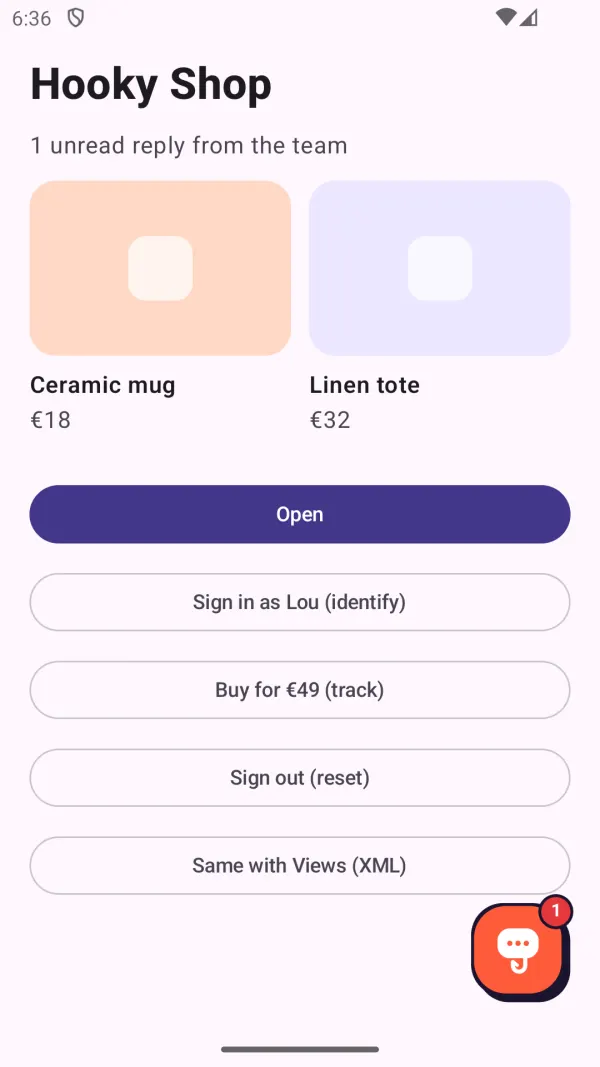
A button in your site’s color (64 dp), with the Hooky logo and a badge for replies not read yet. Tapping it opens the conversation. It appears as soon as the site’s appearance has loaded.
Jetpack Compose
Box(Modifier.fillMaxSize()) {
    MyScreen()
    HookyBubble(Modifier.align(Alignment.BottomEnd).navigationBarsPadding().padding(20.dp))
}

// With your own action
HookyBubble(onClick = { showHelp = true })
XML views
<FrameLayout …>
    <!-- your screen -->
    <com.heyhooky.sdk.HookyBubbleView
        android:layout_width="wrap_content"
        android:layout_height="wrap_content"
        android:layout_gravity="bottom|end"
        android:layout_margin="20dp" />
</FrameLayout>
The activity that shows it must be an AppCompatActivity or a ComponentActivity.
Open and close the conversation
Hooky.open(context)   // full screen (an Activity), from any Context
Hooky.close()         // closes it
The conversation screen, HookyActivity, is declared by the SDK: you have nothing to add to your manifest.
Unread messages
The bubble already shows its badge. For your own buttons, the number of team replies not seen yet is available live; it drops back to 0 when the conversation opens.
// Compose: a StateFlow<Int>
val unread by Hooky.unreadCount.collectAsState()
BadgedBox(badge = { if (unread > 0) Badge { Text("$unread") } }) { Icon(Icons.Default.Email, null) }

// Views or Java: a listener (the current value, then each change)
val listener: Closeable = Hooky.addUnreadCountListener { n -> badge.isVisible = n > 0 }
listener.close()   // to stop
In Java:
Hooky.configure(this, "SITE_PUBLIC_KEY");
Closeable listener = Hooky.addUnreadCountListener(n -> badge.setText(String.valueOf(n)));
Replies arrive live while the app is in the foreground; when it comes back, the SDK catches up on what it missed. Version 1.0.0 doesn’t send push notifications to your users. Hooky.isConfigured and Hooky.VERSION round out the API.
Identify the user
Your app knows who is signed in: tell Hooky. On the conversation’s details, your team reads the name, the email, your own user ID, the device and the data you attach. With an email, the conversation no longer asks for a first name or email.
// After sign-in
Hooky.identify(
    name = "Lou",
    email = "lou@example.com",
    userId = "u_1042",                                  // your own ID
    attributes = mapOf("plan" to "Pro", "cart" to 49.9, "beta" to true),
)

// Later: merged with the previous data
Hooky.setAttributes(mapOf("cart" to 12, "last_screen" to "Payment"))
Hooky.setAttributes(mapOf("beta" to null))             // null removes a key

// On sign-out
Hooky.reset()
In Java: Hooky.identify("Lou", "lou@example.com", "u_1042");, or with a Map<String, Object> of data as the fourth parameter.
How it works
- No conversation yet: everything stays in memory (even before
configure) and is sent with the first message. After that, each change is sent right away, grouped (a single request for everything that changes within the same second). Offline, it goes out with the next message or when the app comes back to the foreground. nameandemailreplace the conversation’s (nullclears them on the device);userId = nullleaves it unchanged.- The
userIdis kept with the conversation token. AuserIdthat is different means another account on the same device: the conversation is forgotten, as withreset(). The new user doesn’t see the previous one’s thread. Hooky.reset()closes the conversation and forgets the thread, the identity and the data. Call it on sign-out.
Data rules
| Field | Rule |
|---|---|
| Free data | A flat Map: 50 keys at most, 8 KB in total. New keys replace old ones, the others stay. |
| Key | 1 to 64 characters: letters, digits, spaces, _, . and -. Otherwise it is ignored. |
| Value | A string (cut at 500 characters), a number or a boolean. null removes the key. Lists and maps are ignored, other objects are sent as text. |
userId | 200 characters at most. |
name, email | The name: 100 characters at most. The email: a valid address, otherwise it is ignored. |
Hooky cleans up whatever goes over, and never refuses your user’s message.
This data is declarative: the site key is public, so anyone can use it to send any name, email or userId they like. It helps your team place the person; it doesn’t prove who they are. Never put a secret in it (password, token, card number), and never use it to grant access or act on an account: always check on your side.
Stats
Count what happens in your app, like Hooky.track on the web: cards show up in Stats, alongside the site’s. Call it right after the action has succeeded.
Hooky.track("signup")
Hooky.track("order", 49.9, mapOf("plan" to "pro", "seats" to 3, "trial" to false))- The second parameter,
value: an amount or a quantity, summed in the card. Properties are flat (strings, numbers, booleans). - Call
configurefirst: before it,trackdoes nothing. Failures are silent; offline, the event is lost. - Same rules as on the web (name, 20 properties at most, rate limit): see Stats in the page.
Never send personal data (email, name, phone) in an event. Count actions, not people.
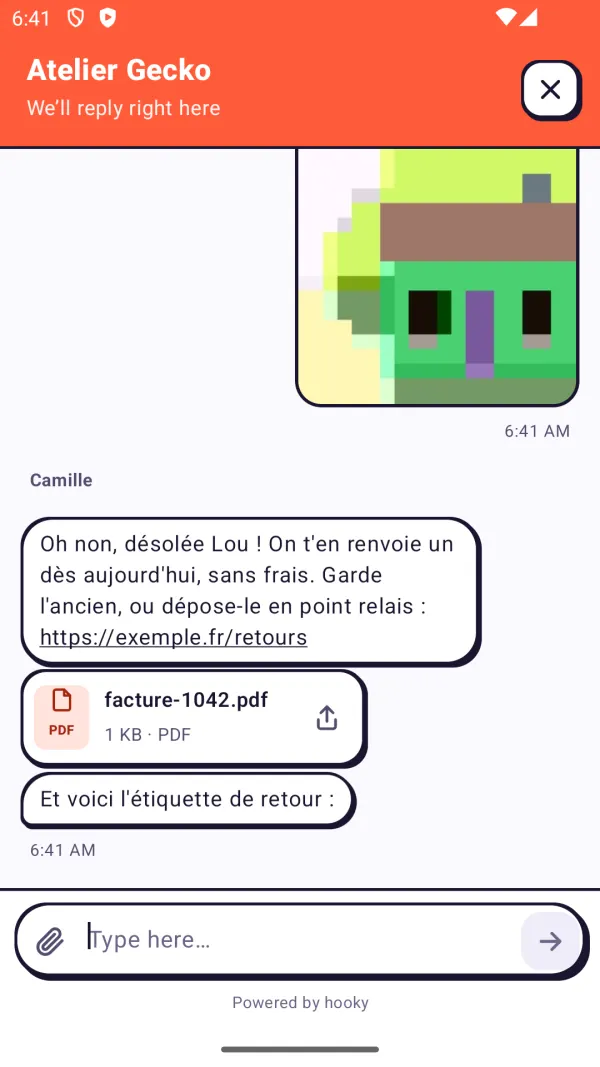
What the conversation does
- The first message, with an optional first name and email (or the ones from
identify), then a thread like the web bubble’s: day separators, team names, links, large emoji, “Read”, “… is typing”, older messages on demand. - Up to 4 attachments per message, 10 MB each, with a progress bar: photos from the system picker (no permission to ask for), from the camera (through the phone’s camera app) and PDFs from Files.
- Received photos open full screen (pinch or double-tap to zoom); files open in the app that can read them, or can be shared.
- The draft survives closing the screen and the app. The keyboard never covers the input field.
- Plain errors: offline, too many messages at once, file too large or refused.
What the SDK adds to your app
- The
INTERNETpermission, and no other. HookyActivityand aFileProvider(authority<your.package>.hooky.fichiers, limited to thehooky/folder of your app’s cache) for camera photos and received files.<queries>for apps that take photos or open PDFs (Android 11 and later).
If your app itself declares the CAMERA permission, Android also requires it to open the camera app: the SDK then asks for it first.
Message translation
Your user and your team each write in their own language, as with the web bubble (see Message translation).
- Under a team message written in a language other than the conversation’s (the device’s), a discreet Translate link. Once translated, the message shows in the user’s language, with “Translated from French · See original” to go back to the original text.
- The translation button in the header offers Always translate: your team’s messages then arrive already translated. The choice is kept on the device, for each site key.
- A failed translation shows a short error with Try again. The user’s messages are never translated on their side; your team has its own Translate button, in the dashboard and the Hooky app.
- Only text is translated, not attachments. Translation is on by default; to remove it from your app:
Hooky.configure(context, "SITE_PUBLIC_KEY", translation = false).
What the SDK sends
What the web bubble sends, and nothing else. No advertising ID, no device ID, no analytics library. To fill in the Data safety section of your Google Play listing:
| Data | When | Data safety |
|---|---|---|
| Messages | When the user writes | Messages: Other in-app messages |
| Photos and PDFs | When they attach them | Photos and videos: Photos; Files and docs |
| First name and email | If they give them, or if you pass them to identify | Personal info: Name, Email address |
Your userId | If you pass it to identify | Personal info: User IDs |
| Free data | What you pass to identify and setAttributes | Depends on what you put in it |
track events | When you send them, with no personal identifier | App activity: Other actions (Analytics) |
| Device, language, time zone, app | With the conversation | Technical information for your team (see below) |
- This data is used for App functionality (customer support), and stats for your Analytics. It is encrypted in transit (HTTPS and secure WebSocket). Hooky processes it on your behalf: as Google Play defines it, this is not “sharing” with a third party.
- The device is readable: “Samsung SM-S918B · Android 15” (manufacturer, model and Android version). The conversation’s page is
android-app://<your.package>. Each request carriesX-Hooky-Client: hooky-android/1.0.0andX-Hooky-App: <package> <versionName> (<versionCode>): your team sees the conversation come from “Android · com.example.app 2.3.1 (231)”. - On the device: the conversation token (the user’s only key), the
userIdand the draft, per site key, in a private file of your app undernoBackupFilesDir: never backed up to the cloud or restored on another device. A translation only sends the message’s ID and the conversation’s language. - Hooky is a processor under the GDPR: see the privacy policy. You remain responsible for your listing: declare what your app really sends.
Language, dark mode, accessibility
- Language
- The interface comes in French, English, Spanish, Portuguese, Italian and German. It follows the device’s language at the time of
configure, English by default. The language is sent with the first message, so your team replies in the right language and at the right time (with the time zone). - Dark mode
- The conversation and the bubble follow the system’s light or dark theme, with your site’s color. Nothing to set.
- Accessibility
- TalkBack labels on every control (the bubble: “Open chat with …”, and the unread count), system text size respected.
R8 and ProGuard
Nothing to add. The SDK doesn’t use reflection and ships its own rules: R8 can shrink everything in your release build.
Troubleshooting
- My site has declared its addresses: is the app refused?
- No. An app has no address: it identifies itself with its
X-Hooky-Clientheader and gets through even when the site has declared its domains. Don’t add anything in Sites. - The bubble doesn’t appear
- It waits for the site’s appearance. Check that
configureis called, with the site’s public key (not the secret keyhks_…, nor an API keyhka_…). With no network at launch, it appears the next time the app comes back to the foreground. - Crash with
HookyBubbleView - The activity must be an
AppCompatActivityor aComponentActivity. - Offline
- The message shows the error and stays in the field;
identifyandsetAttributesare sent later.trackevents sent while offline are lost. - Another user sees the old conversation
- Call
Hooky.reset()on sign-out, and pass auserIdtoidentify: a different ID starts from a blank conversation.
Changelog
- 1.0.0
- First release:
configure, the Compose and XML bubble,openandclose,identify(withuserIdand free data),setAttributes,track,reset, live unread count (StateFlowand Java listener), photos and PDFs, translation of your team’s messages, six languages, dark mode and TalkBack.